

Open a chapter.
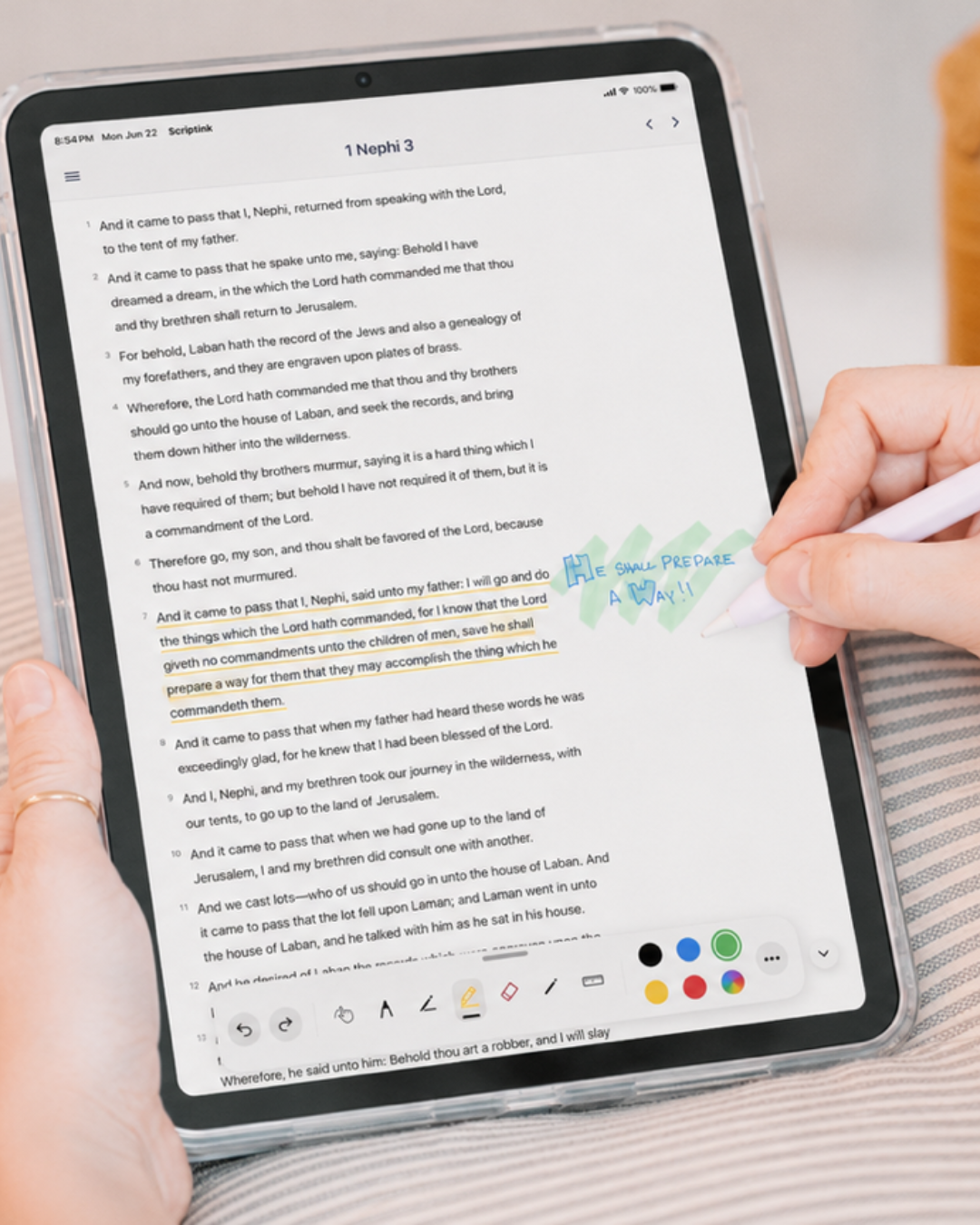
Choose your book and chapter, then settle into a clean, journal-like scripture page.
Read. Reflect. Create.
Make scripture study personal. Highlight the words, write in the margins, and keep the impressions that make your study yours.


For tablets and Apple Pencil / Stylus · English & Spanish
Your next chapter starts here
Start with the Book of Mormon. Free to read, mark, and study.
A little less scrolling. A little more reflecting.
Once you’ve downloaded the app, getting started is simple.
Choose your book and chapter, then settle into a clean, journal-like scripture page.
Use an Apple Pencil / Stylus compatible with your tablet to highlight, underline, draw, and write.
Write in the wide margins. Your notes, markings, and reading place are saved on your device.
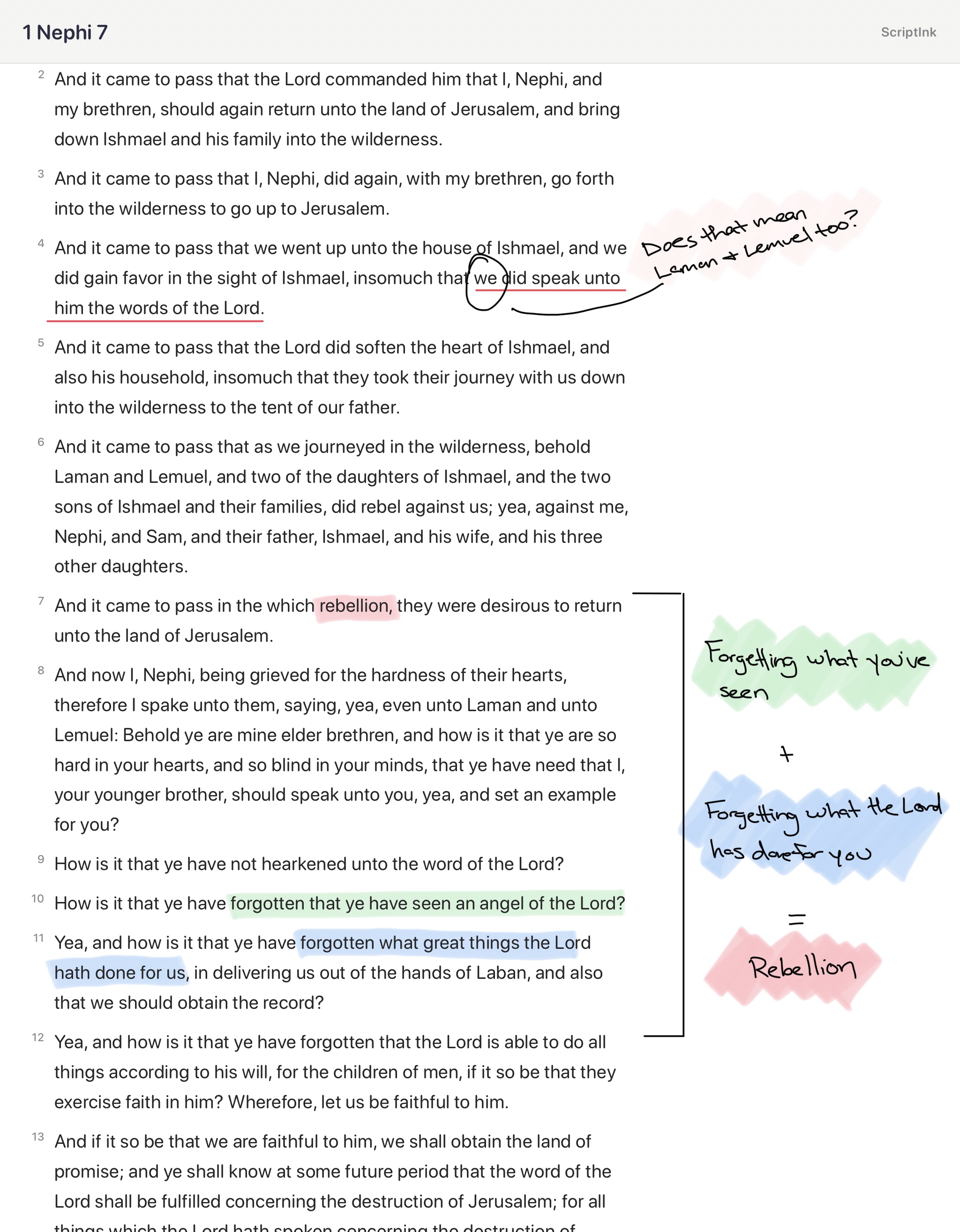
Handwritten study
Underline a phrase. Circle a pattern. Write the thought you do not want to lose. Wide margins and drawing tools make room for the impressions that arrive while you study.
Pen. Pencil. Marker. Highlighter.
Ruler. Eraser. Your way to study.
ScriptInk+
Bring General Conference messages into your study. Organize the verses, questions, and ideas you want to keep together. The full Standard Works are included for as long as your subscription is active.
Open conference messages alongside your scripture study and keep timely counsel close to the verses that matter.
Organize discoveries by topic, lesson, question, or prompting. Catch an idea, tag it, and find it again.
Link related verses and follow the thread as one truth opens the door to another.
Build focused collections for a new calling, Come, Follow Me, a favorite theme, lesson prep, or the question on your mind.
Start free. Study your way.
Good questions. Clear answers.
ScriptInk is a tablet scripture study app that combines digital reading with handwritten study. Read, highlight, draw, and write beside the text with Apple Pencil / Stylus.
It is for anyone who wants a more personal and visual study experience—especially people preparing lessons, talks, Come, Follow Me discussions, or simply recording impressions as they read.
Most scripture apps prioritize reading, searching, and reference tools. ScriptInk is built around reflection and creativity, making your tablet feel more like a personal scripture journal.
Navigate by book and chapter, highlight or underline passages, write and draw with Apple Pencil / Stylus, use wide study margins, erase markings, undo or redo changes, and save annotations by chapter.
Yes. ScriptInk is designed for tablet study with Apple Pencil / Stylus. Handwritten scripture study is one of its core experiences.
Yes. You can type your notes or handwrite them, then convert your handwriting to text.
Yes. Highlights, drawings, handwritten notes, and your reading place are saved on your device so you can return to them later.
The Book of Mormon is available free. Unlock the full Standard Works with a one-time purchase of $19.99, or access them through ScriptInk+ while your subscription is active.
ScriptInk currently supports English and Spanish, with more languages planned for future updates.
You can read and study the Book of Mormon for free. The full Standard Works are available through a one-time purchase of $19.99 or included with ScriptInk+ while your subscription is active.
ScriptInk+ includes the full Standard Works while your subscription is active, plus General Conference access, tags, linked verses, and Study Sets for callings, Come, Follow Me, themes, lesson prep, and more. It is $4.99 per month or $49.99 per year.
No. ScriptInk is an independent scripture study tool and is not an official app of The Church of Jesus Christ of Latter-day Saints.
No. ScriptInk is neither made, provided, approved, nor endorsed by Intellectual Reserve, Inc. or The Church of Jesus Christ of Latter-day Saints. Its content and opinions are solely those of ScriptInk.
No. Gospel Library remains the best place for official Church content, manuals, conference talks, footnotes, and study resources. ScriptInk offers a different, handwriting-first experience.
Use ScriptInk when you want to slow down, write in the margins, draw connections, and build a visual record of your study.
Yes. It is useful for marking patterns, recording impressions, preparing lessons, and keeping family discussion notes beside the scripture text.
Yes. ScriptInk supports portrait and landscape mode.
Mobile phone capabilities are coming in early fall of 2026.
Yes. ScriptInk is available for Android tablets on Google Play. Mobile phone capabilities are coming in early fall of 2026.
For the best handwriting experience, use an Apple Pencil / Stylus compatible with your tablet. ScriptInk is designed for people who want to write, draw, highlight, and mark scripture by hand.
Choose a stylus compatible with your tablet. For Apple tablets, this affordable stylus on Amazon is a reliable option for handwritten study.
Yes. ScriptInk supports cloud syncing between devices linked to the same Apple ID or Google Play account.
Exporting and sharing are not currently available, but may be considered for a future update.
Search is not currently available. ScriptInk is focused on reading, navigation, highlighting, handwriting, and margin-based study.
The vision is a beautiful, focused scripture journal that helps people study deeply, record spiritual impressions, and build a meaningful personal study record over time.
Send questions, feedback, or bug reports to scriptinkapp@gmail.com. Including your tablet model, operating system version, chapter, and a screenshot helps.
Your study data is stored on the device where it was created, and ScriptInk does not sell personal study data. This website uses the Meta Pixel to measure visits and improve advertising. Read our Privacy Policy for details.
Read the scriptures. Reflect on what the Spirit teaches you. Create a personal record through highlights, notes, markings, and impressions. That is the heart of ScriptInk.
Read. Reflect. Create.
Start your scripture journal with ScriptInk.
Download for tablet